
Transforms
Reshape a value as it’s inserted: change its case, trim it, turn it into a slug, and more.
A Transform reshapes a value just before SimpleFill inserts it. It can capitalize a name, turn a page title into a URL slug, move a date forward a week, or format it exactly how you like. Transforms work on Smart Fields, Fields, and plain-text snippets.
How to use a Transform
Add a | (a pipe) and the Transform’s name after a value.
Typed on a page, after a shortcut:
;title|uppercase
As soon as you type the |, the shortcut dropdown lists the Transforms that fit that value, each with what it does. Pick one with the arrow keys, and Enter writes its full name for you. Press Enter without picking one to insert the value as it is.
In a snippet, inside the curly braces:
{{page.title | uppercase}}
On a pill in a rich snippet: click the pill, then Add transform under Transforms.
Chain them
Add as many as you like. They run left to right, each one working on the result of the one before:
{{page.title | slugify | truncate(30)}}
Getting Started with SimpleFill: Fill Any Form becomes getting-started-with-simplefil, exactly 30 characters.
Give them details
Some Transforms need a detail, like how many days to add. Put it in parentheses. Put text in quotes, and separate several details with commas:
{{date | addDays(7)}}
{{page.title | replaceAll("-", "/")}}
{{page.title | truncate(40)}}
When typing on a page, the last ) can be left off: ;date|addDays(7 works too. Until the details are complete, with no quote left open or comma with nothing after it, SimpleFill inserts nothing and says what’s missing, so a half-typed Transform never fills in the wrong thing.
All Transforms
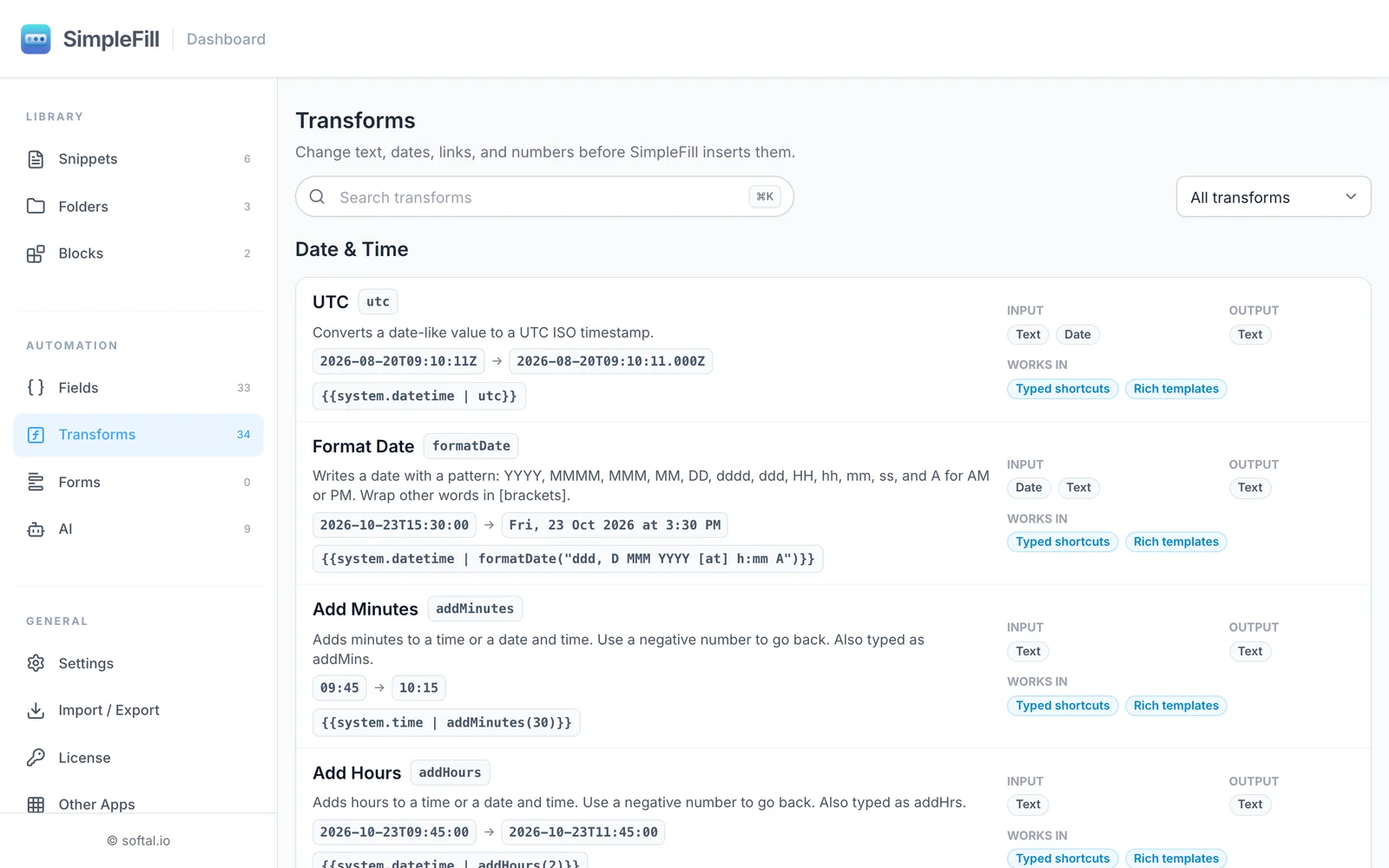
You can browse them all in the dashboard under Transforms, each with an example.
Text
| Transform | What it does | Example |
|---|---|---|
uppercase | Capital letters | Ram Patra → RAM PATRA |
lowercase | Small letters | Ram Patra → ram patra |
titleCase | Capitalizes each word | ram patra → Ram Patra |
sentenceCase | Capitalizes each sentence | THANKS FOR WRITING. TALK SOON! → Thanks for writing. Talk soon! |
camelCase | Joins words for code | Customer first name → customerFirstName |
snakeCase | Joins words with underscores | Customer first name → customer_first_name |
slugify | Makes a URL-friendly slug | Ram Patra Apps → ram-patra-apps |
trim | Removes spaces at the start and end | ␣␣Ram Patra␣␣ → Ram Patra |
truncate(n) | Cuts to at most n characters | truncate(10): SimpleFill extension → SimpleFill |
replace("a", "b") | Replaces the first match | 2026-08-20 → 2026/08-20 |
replaceAll("a", "b") | Replaces every match | 2026-08-20 → 2026/08/20 |
count | Counts characters, emoji included | Hi 🙂 → 4 |
wordCount | Counts words | SimpleFill saves time → 3 |
prettifyJson | Lays out JSON neatly | {"id":1} → indented JSON |
minifyJson | Squeezes JSON onto one line | indented JSON → {"id":1} |
Format dates
| Transform | What it does | Example |
|---|---|---|
formatDate("pattern") | Writes a date your way | ddd, D MMM YYYY [at] h:mm A → Fri, 23 Oct 2026 at 3:30 PM |
addMinutes(n), or addMins(n) | Adds minutes; negative goes back | 09:45 + 30 → 10:15 |
addHours(n), or addHrs(n) | Adds hours | 09:45 + 2 → 11:45 |
addDays(n) | Adds days | 2026-10-23 + 7 → 2026-10-30 |
addBusinessDays(n) | Adds weekdays, skipping weekends | Friday + 5 → next Friday |
addWeeks(n) | Adds weeks | 2026-10-23 + 2 → 2026-11-06 |
addMonths(n) | Adds months, keeping to the month’s end | 2026-01-31 + 1 → 2026-02-28 |
addYears(n) | Adds years | 2026-10-23 + 1 → 2027-10-23 |
startOfMonth | The first of the month | 2026-10-23 → 2026-10-01 |
endOfMonth | The last day of the month | 2026-10-23 → 2026-10-31 |
utc | Converts to a UTC timestamp | 2026-08-20T09:10:11.000Z |
The patterns formatDate understands:
| Pattern | Gives you | Pattern | Gives you |
|---|---|---|---|
YYYY | 2026 | dddd | Friday |
YY | 26 | ddd | Fri |
MMMM | October | HH / H | 15 (24-hour) |
MMM | Oct | hh / h | 03 / 3 (12-hour) |
MM / M | 10 | mm | 30 (minutes) |
DD / D | 03 / 3 | ss | 00 (seconds) |
A | PM | [text] | text, exactly as written |
Month and day names follow your browser’s language.
A few things worth knowing about dates:
- A date stays a date. After
addDays,addMonths,startOfMonth, and the like,{{date | addDays(7)}}is still written in your date format, just a week later. UseformatDatewhen you want a different look. - The value keeps its shape. A date stays a date, a time stays a time (
23:45+ 30 minutes is00:15), and a date and time keeps its time. - Days and longer need a date; hours and minutes need a time.
;time|addDays(1)and;date|addHours(2)don’t run, rather than quietly dropping part of the value. - Dates are read as SimpleFill writes them:
2026-10-23,09:45, or2026-10-23T09:45, with or without a time zone likeZor+05:30. Text such asOct 23, 2026isn’t read as a date, so nothing that merely looks like one, likeTicket 42, gets turned into one.
Numbers
| Transform | What it does | Example |
|---|---|---|
round | Rounds to the nearest whole number | 12.6 → 13 |
floor | Rounds down | 12.6 → 12 |
ceil | Rounds up | 12.1 → 13 |
abs | Removes the minus sign | -12 → 12 |
Numbers are read using the Number format in Settings, so 1.234,56 works if that’s how you write numbers.
Encoding
| Transform | What it does | Example |
|---|---|---|
urlEncode | Makes text safe inside a link | Ram Patra → Ram%20Patra |
urlDecode | Turns it back | Ram%20Patra → Ram Patra |
base64Encode | Encodes as Base64 | Ram → UmFt |
base64Decode | Decodes Base64 | UmFt → Ram |
When something doesn’t fit
Each Transform works on certain kinds of values. You can’t uppercase a number, for example. If a Transform can’t run, SimpleFill inserts the value as it was before that step and tells you what went wrong, so you never lose your text.
A Transform that’s still being typed is different. If its name could mean several, or its details are missing or wrong, a typed shortcut inserts nothing yet, and the dropdown shows what’s needed.
Examples
A search link. https://www.google.com/search?q={{clipboard | urlEncode}} turns whatever you copied into a ready-made search link.
A due date in words. Due {{date | addDays(14) | formatDate("dddd, D MMMM")}} gives Due Friday, 6 November.
A clean branch name. ;title|slugify on a GitHub issue gives a branch name like fix-login-redirect-loop.
Names that look right. Put titleCase on a customer-name Field, and it doesn’t matter how you type it.