Comparisons9 min read
SimpleFill vs Magical: a Magical alternative for templates, AI, and form filling
Magical now focuses on AI agents for healthcare, and its extension lost most of its AI features in 2025. Here's how SimpleFill compares on templates, form filling, AI, privacy, and price.
By Ram Patra
Magical made its name as a free Chrome extension that expanded templates and copied details from one tab into another. If you're using it today, or looking at it, you've probably noticed things have changed. The company now sells AI agents for healthcare operations, prices are no longer on its website, and most of the extension's AI features were removed in 2025.
SimpleFill does the same everyday jobs, expanding templates, filling forms, and helping you write, with a few differences that matter: a much more capable editor, AI that runs on your own provider or your own computer, and a library that stays in your browser instead of on someone's server. Here's an honest, side-by-side look.
The short answer
- Pick SimpleFill if you want designed templates (signatures, invoices, replies with real formatting), reusable pieces you edit once, AI actions where you write, form filling that copes with dates, checkboxes, and calendars, and no account or subscription.
- Magical may still suit you if your main job is moving records between open tabs, say from a LinkedIn profile into a Google Sheet or a CRM, and your team already shares templates there.
Magical in 2026
It helps to know where Magical stands before you compare features:
- The company's focus has moved. The Magical homepage now offers AI agents for healthcare work like prior authorizations and referrals. The text expander is still sold through the Chrome Web Store, and its help center is still updated.
- Most AI features are gone. AI Assist, AI Reply, writing-style matching, and the Magical toolbar were removed from the extension in May 2025, according to Magical's own help articles. What remains is AI Transforms, which reshape details read from a page.
- Prices are behind a sign-in. The pricing page now redirects, and Magical's help center says you need an account and the extension to see plans. When prices were last public, Core was $6.50 per user a month and Advanced $12.
At a glance
| SimpleFill | Magical | |
|---|---|---|
| Price | $29 or $59, once | Monthly, per user |
| Account required | No | Yes |
| Templates stored | In your browser | On its servers |
| Browsers | Chrome, Edge, Firefox, Safari | Chrome, Edge |
| Headings, colors, tables, cards | ||
| Upload images | ||
| Reusable pieces inside templates | ||
| Fill-in fields (text, dropdown, date) | ||
| Details read from the page | ||
| Copy many open tabs into a sheet at once | ||
| Save a form, fill it in one click | ||
| Calendar date pickers in forms | ||
| Key presses and clicks in templates | ||
| AI writing actions | ||
| Your own AI key or a local model | ||
| Search everything from one shortcut |
Templates that look designed
This is the biggest difference you'll see on day one.
Magical's editor covers the basics: bold, italics, links, and emoji. For anything more, it has a source code editor where you write HTML yourself, and images have to be hosted somewhere else first. Its formatting guide suggests testing the result in the app you'll paste into.
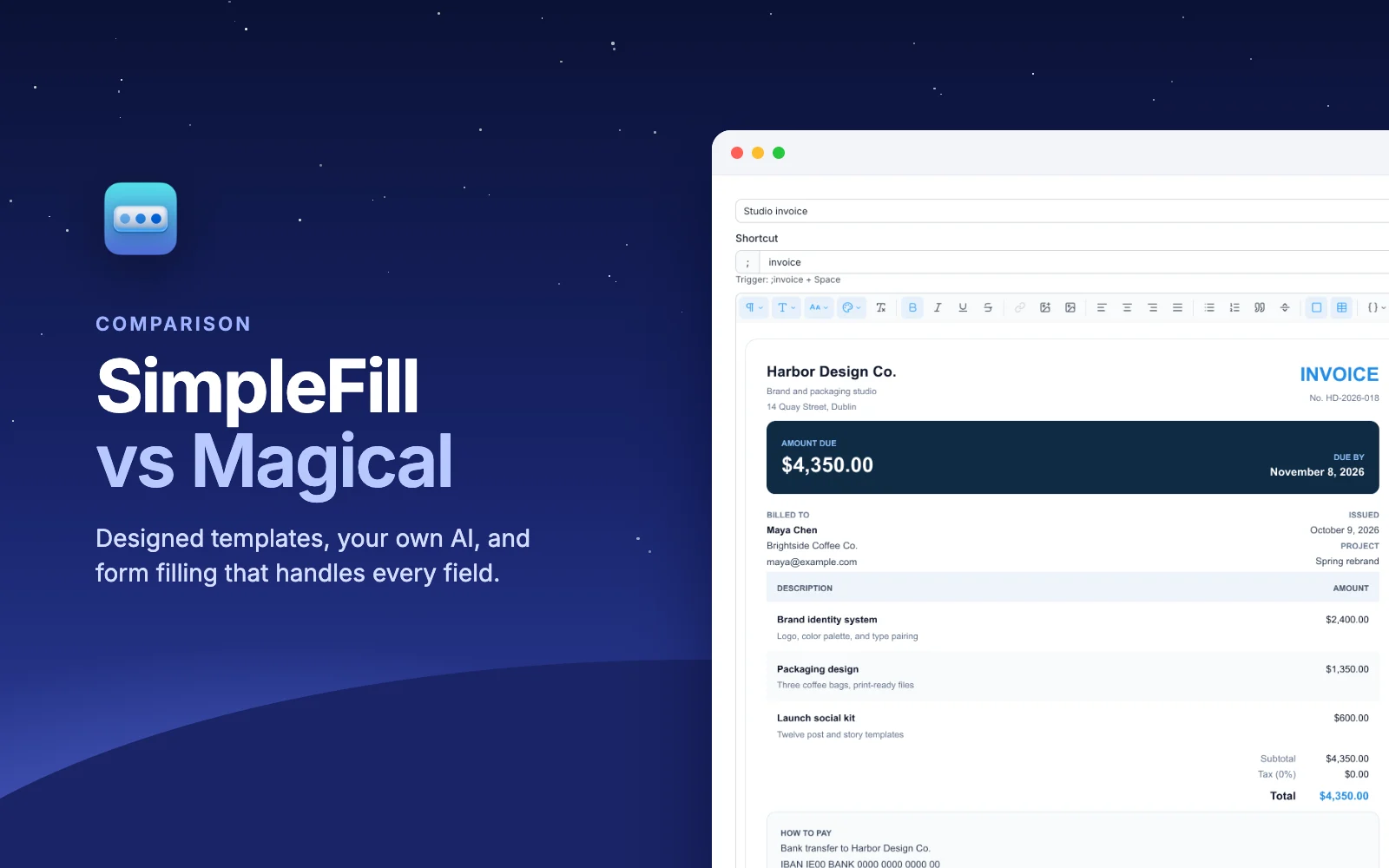
SimpleFill's rich text editor works like a modern document editor. You get headings, fonts and sizes, text colors and highlights, lists, quotes, links, images you can upload, tables, and cards with their own background, padding, border, and rounded corners. That's enough to build an invoice, a résumé, or an email signature with a photo, without touching HTML.
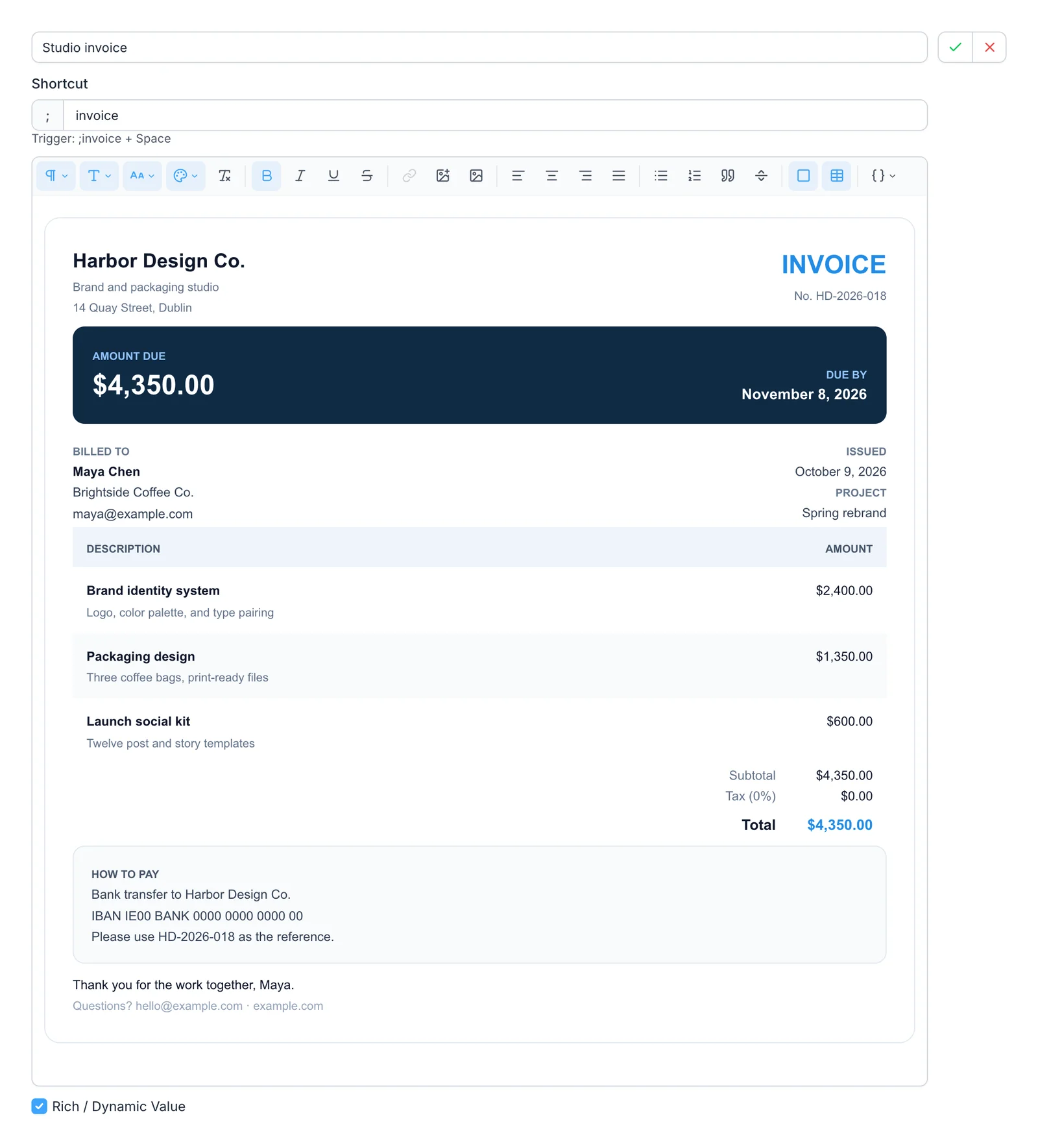
Everything you see there was made in the editor, and it pastes into Gmail, Outlook, Notion, and Google Docs with the formatting intact. If you'd rather not start from scratch, the marketplace has ready-made signatures, invoices, résumés, and replies you can add in one click and change however you like.
Write it once with Blocks
Most people end up with the same piece in a dozen templates: a signature, an address, a legal disclaimer. Magical has no way to put one template inside another, so a new phone number means editing every template that has it.
SimpleFill has Blocks. A Block is a reusable piece of content
you drop into any snippet by typing @. Change the Block, and every snippet
that uses it changes too.
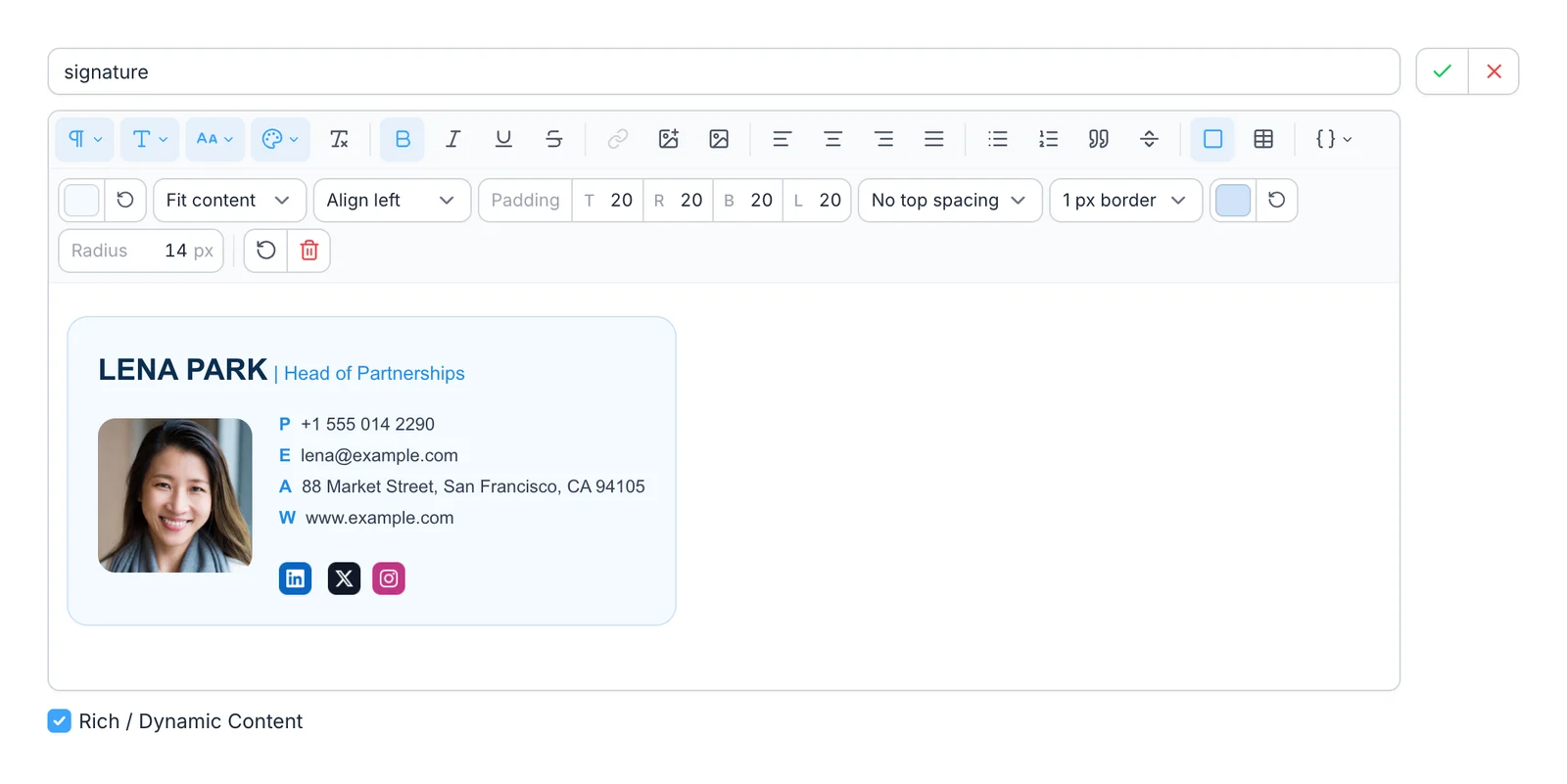
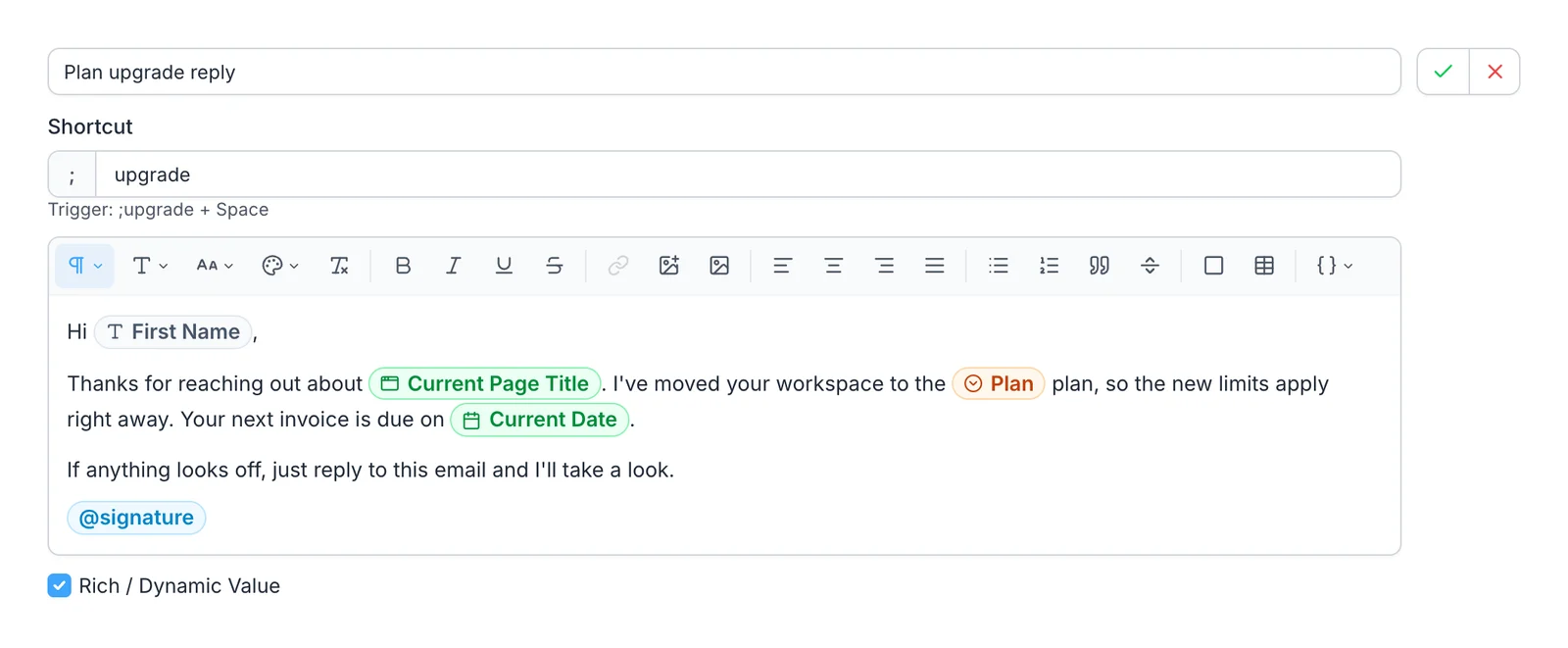
Here's that signature Block in use. The reply also has Fields, shown as colored pills, that SimpleFill fills in each time:
Fields and details from the page
Magical's strength has always been site info: you label details on a page, like a name on a LinkedIn profile, and its templates fill them in from your open tabs. It comes with labels for many popular sites, and it's genuinely handy for outreach.
SimpleFill covers the same ground in a few layers:
- Fields ask you for what changes each time, as text, longer text, a dropdown, a multi-select, or a date picker.
- Smart Fields fill themselves in: today's date, the page's title or link, your clipboard, or what's already in the box.
- Add-ons read details from specific websites. There are
add-ons for LinkedIn, HubSpot, X, GitHub, Jira, and Google Docs, so
Hi {{li.firstname}}greets the person whose profile you're on. - Transforms reshape any value as it goes in. There are
34 of them, like
titleCase,slugify, and date math, and you can chain them. - Calculations and If / Else let a template do the math or show different text depending on what you enter.
Form filling that handles every field
Magical's autofill automations map details from one tab into the fields of another, and they work well for text boxes. Dropdowns and radio buttons are in beta and single-select only, and Magical's own help article notes that custom dropdowns may not be recognized. In our tests on real forms, Magical left date fields empty.
SimpleFill gives you two ways to fill a form, depending on the job.
Saved forms, for forms you fill again and again. Right-click a page and choose Save Form. SimpleFill scans every field, you set the values, and from then on one click fills the whole thing. It saves text boxes, dropdowns, radio buttons, checkboxes, multi-select lists, and dates, including the calendar pickers sites draw themselves. SimpleFill opens the calendar, moves to the right month, and clicks the day. A date can be fixed, today, or a number of days from today. See one-click form fill.
Snippets, for forms that need steps. A snippet can type text, press Tab, Enter, or the arrow keys, and click a button, a switch, or an option in a list. So one shortcut can fill a form, pick a date, tick a checkbox, and press Submit, even when the form spans several steps.
AI that works where you write
With AI Assist and AI Reply gone, Magical's AI is now limited to AI Transforms, which count against your plan's usage.
SimpleFill comes with ten AI actions: Fix Grammar, Rewrite,
Make Professional, Make Casual, Summarize, Bullet Points, Translate, Generate
Reply, Extract Action Items, and Ask AI. Type ;fix at the end of a message,
or pick an action from the right-click menu or Quick Access. You can write your
own actions too.
- They see the page. Generate Reply reads the conversation above an empty reply box and answers it.
- They remember you. Save a few notes in Memory, like how you sign off, and actions use them.
- You choose the AI. Use your own OpenAI or Anthropic key, any OpenAI-compatible service, or a model on your own computer with Ollama or LM Studio, where nothing leaves your machine. SimpleFill AI, with credits included and no key needed, is coming soon.
Privacy
Magical needs an account. Its help center says templates are stored and encrypted on Magical's servers, and its privacy policy covers data such as the shortcuts you use, the text they expand to, and content on pages you visit. Magical has a SOC 2 Type II report, which matters to many companies.
SimpleFill takes a simpler route: there's no account. Your snippets, Blocks, Fields, saved forms, AI actions, and Memory live in your browser's storage on your computer, and SimpleFill doesn't send anything in the background. AI requests go straight from your browser to the provider you picked. The privacy page lists every case where anything leaves your computer.
Team and Enterprise plans are on the way, with shared folders that sync. They're opt-in: only what you choose to share is stored on our servers, and everything else stays local.
Price
Magical is a subscription billed per user. SimpleFill is a one-time purchase:
| SimpleFill Free | SimpleFill Standard | SimpleFill Pro | |
|---|---|---|---|
| Price | $0 | $29, once | $59, once |
| Snippets, Blocks, Fields, saved forms | 5 each | 50 each | Unlimited |
| Every feature |
Every feature is in every plan, including Free. The plans only differ in how much you can save. One license works in up to three browsers, and SimpleFill for Safari is a separate purchase on the Mac App Store.
When Magical is the better choice
To be fair, Magical still does a few things SimpleFill doesn't:
- Moving records in bulk. Magical's multi-tab transfers copy details from every open tab into rows of a Google Sheet in one go. SimpleFill reads one page at a time. Its snippets can type into a sheet with Tab and Enter, but they don't gather many tabs at once.
- Shared libraries today. Magical's paid plans share templates across a company workspace now. SimpleFill's team plans are coming soon.
- Compliance paperwork. If your security team needs a SOC 2 report from your text expander vendor, Magical has one. SimpleFill sidesteps much of that by not storing your data at all, but that's a conversation to have with your security team.
Try SimpleFill
Install SimpleFill for Chrome, Edge, Firefox, or Safari. Move over the five templates you use most, save one form you fill every week, and see how it feels. The getting started guide walks you through it in a few minutes.
Comparing other tools too? Read SimpleFill vs Text Blaze and SimpleFill vs TextExpander.
Magical details were checked against Magical's website, help center, and Chrome Web Store listing in November 2026. Products change, so if something here is out of date, let us know.