Comparisons9 min read
SimpleFill vs Text Blaze: which text expander fits you?
Text Blaze is a powerful, cloud-based text expander with a monthly subscription. SimpleFill keeps your snippets in your browser, builds AI in, and costs once. Here's how they compare.
By Ram Patra
Text Blaze is one of the most popular text expanders for Chrome, and for good reason. It's fast, it has a real formula language, and its snippets can read from web pages and click through forms. If you're comparing it with SimpleFill, you're choosing between two capable tools that are built on different ideas.
Text Blaze keeps your snippets in its cloud, behind an account, and charges a monthly subscription for most of its power features. SimpleFill keeps everything in your browser, includes every feature on every plan, and costs once. Here's what that means in practice.
The short answer
- Pick SimpleFill if you want to design good-looking templates, keep your data on your computer, use AI with your own key or a local model, save whole forms and fill them in one click, use Firefox or Safari, or simply not pay every month.
- Text Blaze may suit you better if you live in spreadsheet-style formulas, need snippets in desktop apps outside the browser, or your company already shares folders of snippets there.
At a glance
| SimpleFill | Text Blaze | |
|---|---|---|
| Price | $29 or $59, once | From $2.99 a month |
| Free plan | Every feature | Limited features |
| Account required | No | Yes |
| Snippets stored | In your browser | In its cloud |
| Firefox and Safari | ||
| Desktop apps | Coming soon | |
| Images and tables on the free plan | ||
| Reusable pieces inside snippets | ||
| Fill-in fields and If / Else | ||
| Calculations (add, subtract, multiply, divide) | ||
| Advanced formulas (regex, lists, lookups) | ||
| Details read from the page | ||
| Key presses and clicks | ||
| Save a form, fill it in one click | ||
| AI actions in the same extension | ||
| Your own AI key or a local model | ||
| AI memory | ||
| Search everything from one shortcut |
An editor for templates people actually read
Text Blaze's dashboard editor is a solid rich-text editor. Its dynamic parts,
like form fields and formulas, appear as chips you click to configure, and
behind the scenes they're commands such as {formtext: name=first}. On the
free plan, though, snippets can't hold images or tables. Those are
Pro features.
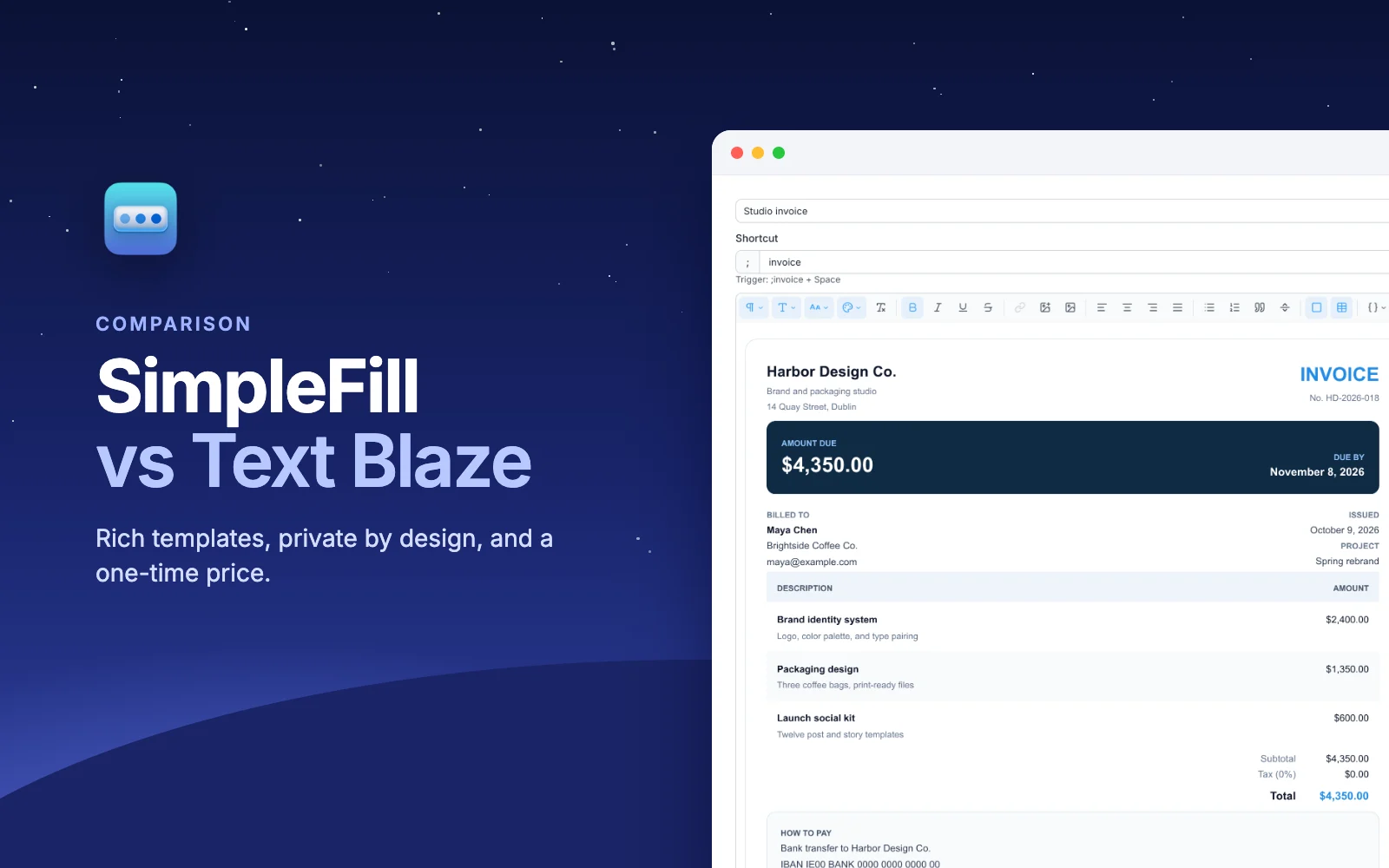
SimpleFill's rich text editor is built for templates that need to look good where they land: an email signature with a photo, a proposal, a receipt, an invoice. Alongside the usual formatting, you get:
- Cards: boxes with their own background, padding, border, and rounded corners.
- Layout tables: borderless tables that put a logo beside your details, the most reliable way to line things up in email.
- Uploaded images, resized and compressed for you, with size, alignment, border, corners, alt text, and links.
- Fonts, sizes, colors, and highlights, headings, and code blocks.
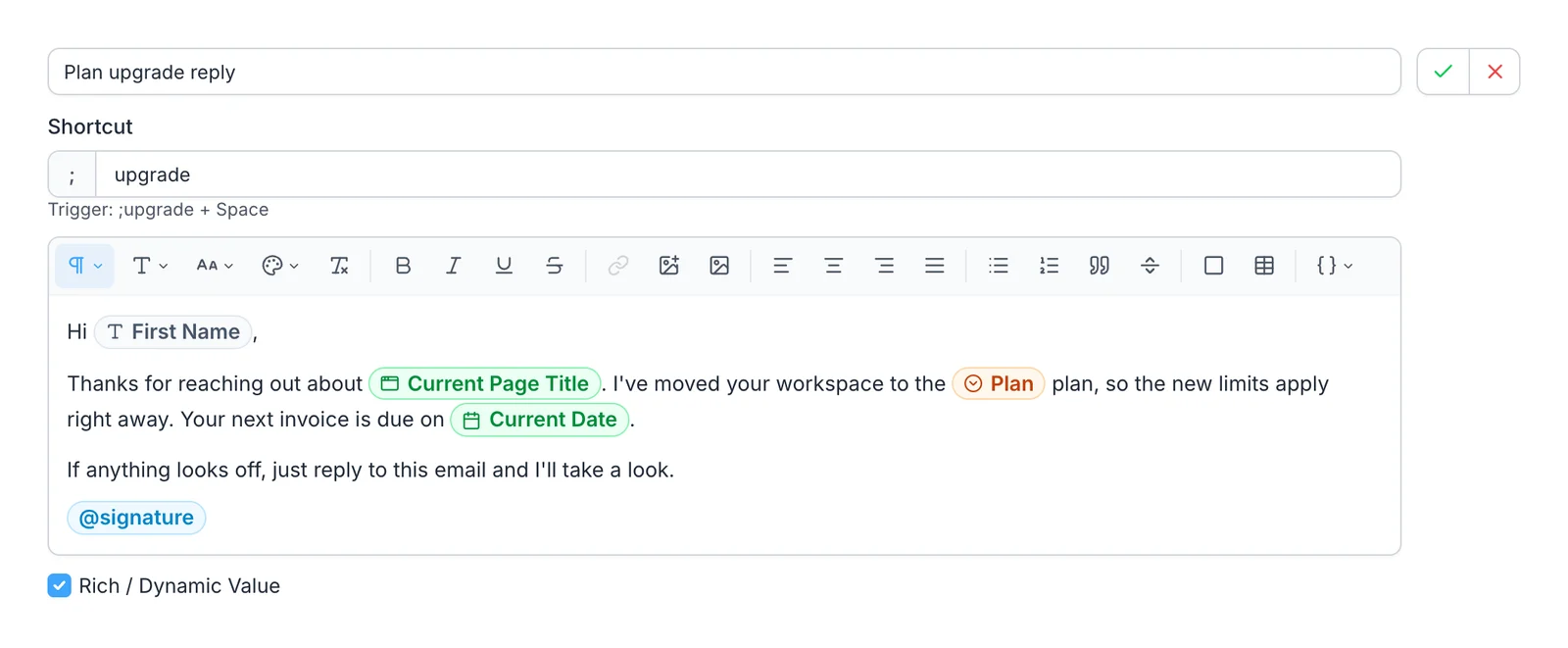
- Fields, calculations, and If / Else that you add by typing
{{and picking from a menu. Each one shows as a colored pill you click to set up, and there's no command syntax to learn or get wrong.
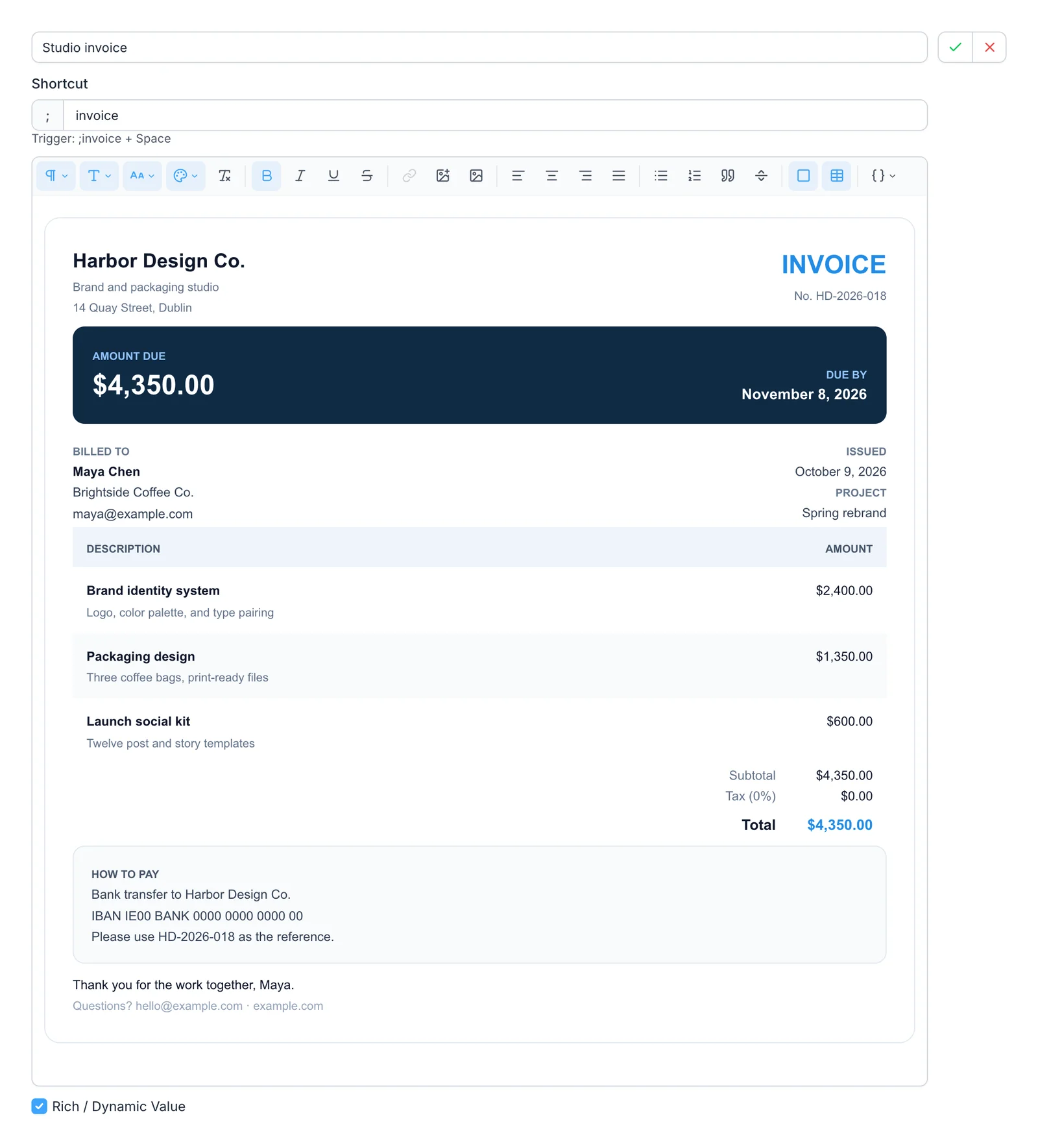
Everything above was made in the editor, with no HTML, and it keeps its formatting in Gmail, Outlook, Notion, and Google Docs. All of it works on the free plan. And when you'd rather not start from scratch, the marketplace has signatures, invoices, résumés, and replies to add in one click.
Blocks vs {import}
Both tools let you reuse one piece of content inside many snippets, so a changed phone number means one edit, not twenty.
In Text Blaze you use the {import} command
with the other snippet's shortcut, like {import: /sig}. The piece you import
is an ordinary snippet, with its own shortcut.
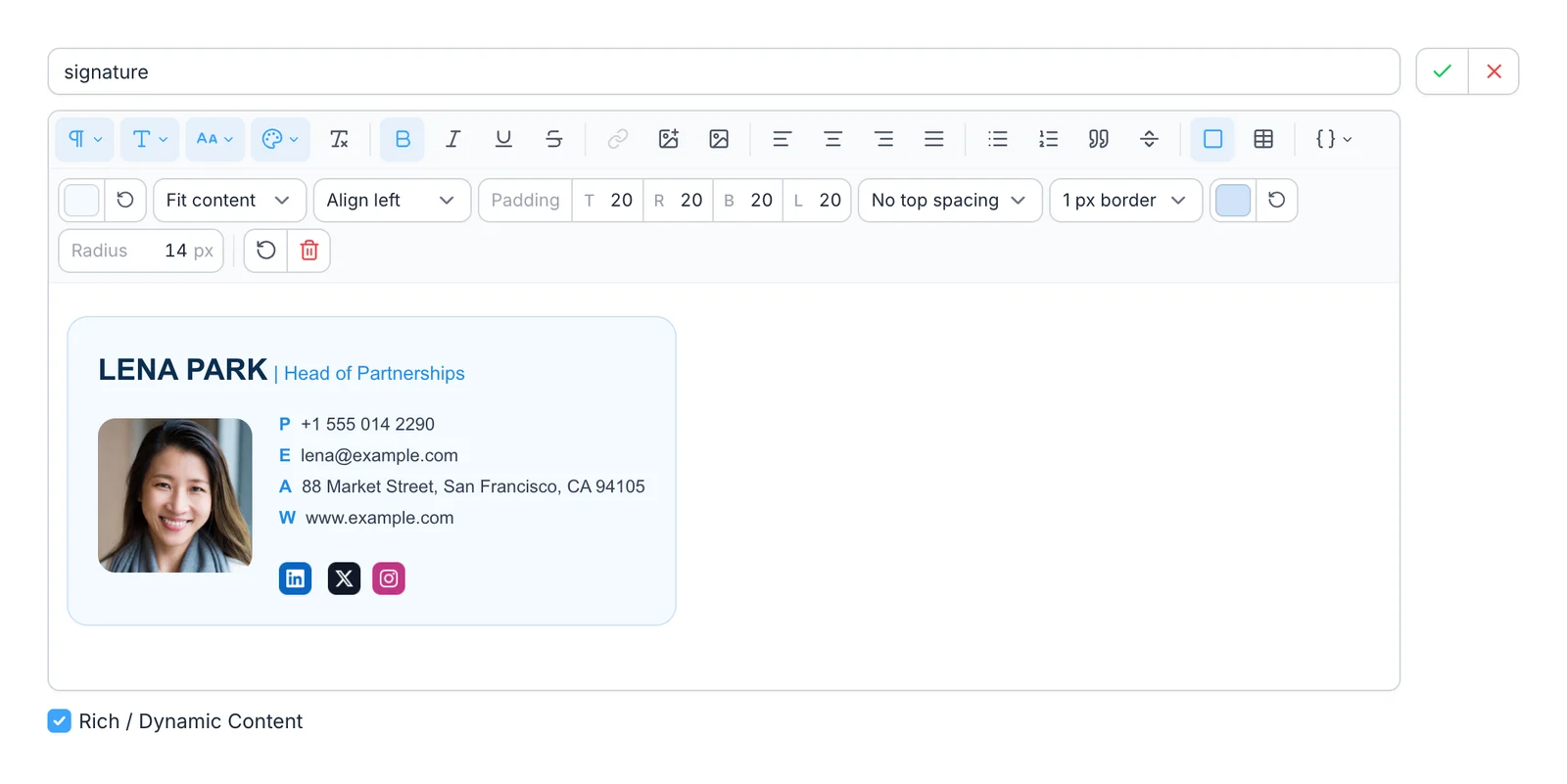
SimpleFill has Blocks, a separate kind of item made for this
job. You type @ in a snippet and pick one, and it shows as a pill. Because a
Block has no shortcut, it never clutters your search results or menus. Rename it
and every reference updates, and SimpleFill won't let you delete a Block a
snippet still uses.
Fields, formulas, and page data
This is where Text Blaze is at its strongest. Its formula language has text, date, math, list, and regular-expression functions, and power users build small apps out of snippets. If that's you, Text Blaze will feel at home.
SimpleFill does the everyday version of the same jobs, without writing code:
- Calculations: add, subtract, multiply, and divide fields, exact to 12 decimal places. One result can feed the next, so hours times rate gives a subtotal, and the subtotals give a total.
- If / Else: show different text when a field equals or contains a value, is empty, or is above or below a number or date.
- Transforms: 34 ways to reshape a value as it goes in.
Round a number with
round,floor, orceil, do date math withaddBusinessDays(3)orformatDate, or tidy text withtitleCase,slugify, andtruncate(80). Chain them as you like. - Fields: text, longer text, dropdowns, multi-selects, and date pickers, filled in a window that shows the whole message.
- Smart Fields: today's date, the page's title or
link, your clipboard, and more, typed anywhere like
;date. - Add-ons for LinkedIn, HubSpot, X, GitHub, Jira, and
Google Docs, so
Hi {{li.firstname}}greets the person whose profile you're on, or{{hs.company.name}}names the HubSpot contact's company.
What SimpleFill doesn't have yet is Text Blaze's long list of formula functions, like regular expressions, list processing, and table lookups. New functions are quick to add, so if your snippets need one, suggest it and tell us what you're building.
Text Blaze reads pages with its {site} command
and CSS selectors, plus command packs for Gmail, LinkedIn, and Slack. It's very
flexible, but selectors are something you write and fix when a site changes.
SimpleFill's add-ons are maintained for you.
Filling forms
Text Blaze's Autopilot commands, {key}, {click}, and {wait}, let a snippet
tab through a form and click buttons. SimpleFill does the same with
key presses and clicks, so one
shortcut can fill a multi-step form and send it.
SimpleFill also has something Text Blaze doesn't: one-click form fill. Right-click a page, choose Save Form, and SimpleFill scans every field. Set your values once, and from then on one click fills the lot: text boxes, dropdowns, radio buttons, checkboxes, multi-select lists, and dates, including calendar pickers that sites draw themselves. There's nothing to build. Keep a Home and an Office version and pick one each time.
AI, built in and on your terms
Text Blaze's AI lives in a separate extension, AI Blaze, with a sidebar chat and prompts you trigger with shortcuts. It runs on the models Text Blaze provides, like GPT-5 and Claude Sonnet. The extension is free to install, with a pay-as-you-go option for heavier use.
SimpleFill's AI actions are part of the same extension as
your snippets. Ten come built in, including Fix Grammar, Rewrite, Translate,
Summarize, and Generate Reply, and you can write your own. Type ;fix at the
end of a message, or pick one from the right-click menu or Quick Access.
- Your AI, your bill. Connect OpenAI or Anthropic with your own key, any OpenAI-compatible service, or a model on your own computer through Ollama or LM Studio. With a local model, your text never leaves your machine.
- Memory. Save a few notes about yourself, like how you sign off, and actions use them.
- Page context. Actions see the text around your text box, so Generate Reply can answer the email above an empty reply.
Prefer not to manage a key? SimpleFill AI, with credits included, is coming soon.
Privacy
To use Text Blaze you sign in, with Google or an email address, and your snippets sync through its cloud, which runs on Google Cloud with encryption in transit and at rest. That's what makes its sharing work, and it's a perfectly reasonable design.
SimpleFill doesn't have an account. Your snippets, Blocks, Fields, saved forms, AI actions, and Memory stay in your browser's storage, on your computer. SimpleFill doesn't send anything in the background, and AI requests go directly to the provider you chose. Read exactly what leaves your computer, and when, on the privacy page.
Team and Enterprise plans are coming, with shared folders that stay in sync. They're opt-in: what you share is stored on our servers, and everything else stays local.
Price
Text Blaze is free to start, with limits, and its paid plans are subscriptions: Pro is $2.99 a month billed yearly ($3.49 monthly), and Business is $6.99 per user a month billed yearly. Images, tables, full forms, and if/then rules need Pro.
SimpleFill is a one-time purchase, and every feature is on every plan:
| SimpleFill Free | SimpleFill Standard | SimpleFill Pro | |
|---|---|---|---|
| Price | $0 | $29, once | $59, once |
| Snippets, Blocks, Fields, saved forms | 5 each | 50 each | Unlimited |
| Every feature |
Over two years, Text Blaze Pro billed yearly comes to about $72. SimpleFill Pro costs $59 once and keeps working.
When Text Blaze is the better choice
- Desktop apps. Text Blaze has apps for Windows and Mac, so snippets work in Slack's desktop app, Word, or your code editor. SimpleFill works in the browser for now, and desktop apps are coming.
- Heavy formulas. If your snippets do regular expressions, list processing, or lookups in Data Blaze tables, Text Blaze has more depth today.
- Team sharing today. Text Blaze's shared folders and Business admin tools are here now. SimpleFill's team plans are on the way.
Try SimpleFill
Install SimpleFill for Chrome, Edge, Firefox, or Safari. Rebuild the five snippets you use most, save one form you fill often, and connect an AI provider. The getting started guide takes a few minutes.
Comparing other tools too? Read SimpleFill vs TextExpander and SimpleFill vs Magical.
Text Blaze details were checked against Text Blaze's website, documentation, plans page, and Chrome Web Store listing in November 2026. Products change, so if something here is out of date, let us know.